 RU
RU ZH
ZH IT
IT ES
ES TR
TR JA
JA PT
PT KO
KO FR
FR DE
DE AR
AR ID
ID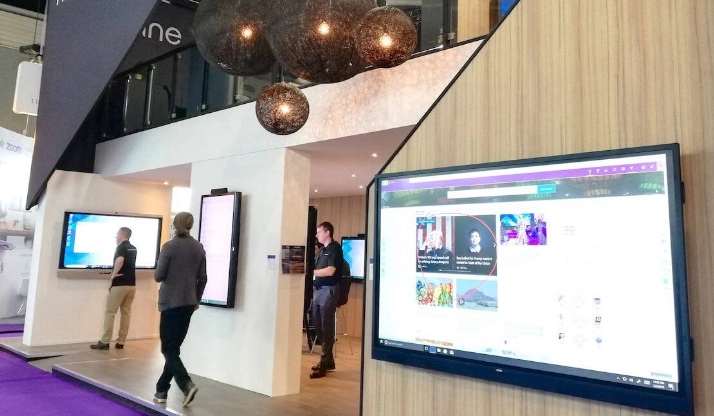
Basic Product Setup
Learn More



Managing content across several digital signage displays can become difficult when every screen has to be updated manually. For a single location, changing a promotional video or information notice may only take a few minutes. For multiple stores, offices, public facilities, or exhibition spaces, the same task can quickly become repetitive and difficult to control.
This is where centralized content management becomes useful. Instead of connecting a computer or USB drive to every display, operators can publish programs remotely and control what appears on different screens from a central system.
The Floor Standing Digital signage 43-55 Inches(SWLD Series) is designed around this type of interactive and managed display environment. Available in 43-inch, 50-inch, and 55-inch configurations, the series supports remote program publishing, split-screen playback, multiple content formats, scheduled playback, and timed power control.
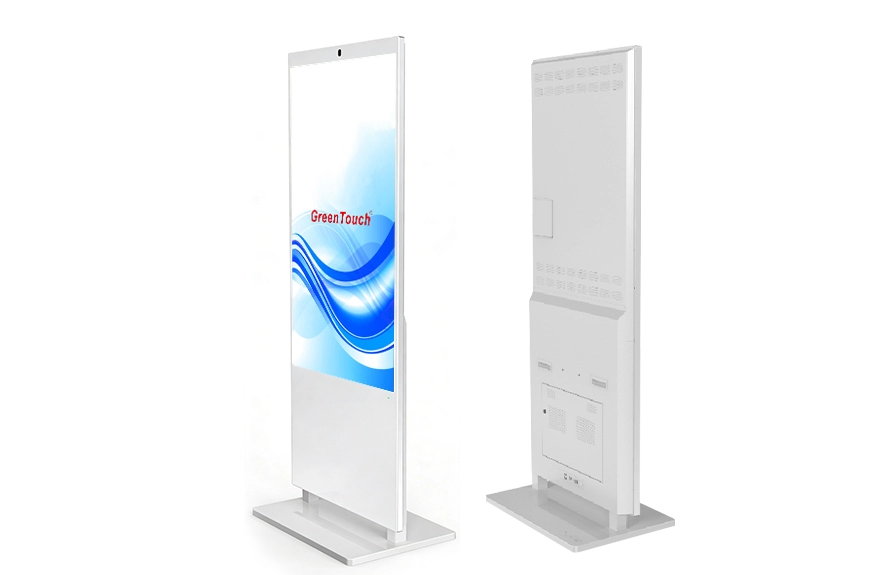
Remote content management allows an operator to update digital signage content without physically accessing each display.
A typical system may contain several floor standing displays installed in different areas. Instead of visiting every unit, the operator prepares the required media or information, assigns it to the appropriate display or group, and publishes the program through the information publishing system.
This can be useful when content changes frequently.
For example, a retail business may need to update promotional information every week. A transportation facility may need to change notices according to operational conditions. A corporate office may display different information in reception areas, meeting spaces, and employee zones.
The main benefit is not simply remote access. It is the ability to keep content organized and make changes consistently across multiple locations.
The SWLD Series comes with an information publishing system that supports remote management across regions. It can also support remote program publishing, allowing operators to update content without relying entirely on local USB playback.
This creates a practical workflow for organizations operating more than one digital signage unit.
Content can be prepared centrally and then assigned to the required displays. Different screens can show different programs according to their location or purpose.
For example, a company could use one screen for promotional content, another for product information, and another for navigation or announcements. The same management approach can be applied across different locations without requiring an operator to manually update every display.
The actual management workflow will depend on the software configuration and network environment, but the underlying principle remains the same: separate content management from the physical location of the screen.
Remote management requires a reliable communication path between the display and the content management system.
The SWLD Series supports LAN connectivity and built-in 802.11b/g/n wireless Wi-Fi. This provides options for connecting the signage system to an existing network infrastructure.
The Android configuration also provides USB, HDMI, SD card, LAN, and audio connections. The Windows configuration provides HDMI, VGA, USB, LAN, and audio interfaces.
For an installation, network planning should be completed before the displays are deployed. The operator needs to determine where each screen will be installed, how it will connect to the network, and whether wired or wireless communication is more appropriate.
For fixed commercial installations, LAN can be useful where network cabling is already available. Wireless connectivity can provide more flexibility when running additional network cables would be inconvenient.
Not every piece of content needs to be displayed throughout the entire day.
The SWLD Series supports time-segmented playback, allowing different content to be scheduled for different periods.
A retail environment, for example, could display one campaign during morning hours and switch to another program later in the day. A corporate building could show general information during working hours and different announcements during scheduled events.
Timed power on and power off can also be configured. This helps align the operation of the display with the opening and closing schedule of a facility.
Scheduling is particularly useful for organizations managing multiple displays because it reduces the number of manual operations required each day.
A large floor standing display does not always need to show one piece of content at a time.
The SWLD Series supports free split-screen playback and multi-format combination playback. This allows different types of information to be arranged within the same display area.
For example, one section of the screen could show a product promotion while another displays pricing information, event details, navigation information, or a video.
This can make better use of the available 43-inch, 50-inch, or 55-inch display area when several pieces of information need to be visible simultaneously.
The appropriate layout depends on the content. A screen used for video advertising may benefit from a large central video area, while an information display may require several smaller content zones.
Remote publishing is not the only way to deliver content.
The SWLD Series supports multiple playback methods, including computer connection, USB flash drive playback, and software-based content management.
This flexibility is useful because not every installation has the same network conditions.
For a permanent multi-location deployment, centralized software management may be the preferred workflow. For a temporary event or a standalone screen, USB playback may be more practical.
A computer connection can also be useful during content preparation, testing, or applications that require an external computing source.
Having multiple playback methods gives system integrators more options when planning an installation.
The SWLD Series can be configured with Android or Windows, depending on the project requirements.
The Android configuration uses Rockchip RK3288 or RK3399 quad-core processors running at 1.8 GHz. The Windows configuration can use Intel J1900 or Intel Core i3, i5, or i7 processors.
The operating system should be selected according to the software environment and content management requirements rather than simply choosing the configuration with the highest specification.
Android can be suitable for installations built around dedicated signage software and embedded operation. Windows can be useful when the project depends on Windows-based applications, external software, or a more conventional PC environment.
Before ordering, integrators should confirm the required software, processor configuration, peripheral connections, and network architecture.
The SWLD Series is available with Full HD 1920 × 1080 or UHD 4K resolution.
The appropriate resolution depends on the content being displayed and the viewing distance.
Full HD can be sufficient for many standard advertising materials, announcements, menus, and information screens. 4K becomes more useful when the content contains detailed product images, high-resolution video, small text, or graphics that need to remain sharp on a larger screen.
Because the SWLD Series is available in 43-inch, 50-inch, and 55-inch sizes, content creators should also consider how much information will be displayed simultaneously.
High-resolution content is particularly useful when split-screen layouts are used because each content area needs enough pixels to remain readable.
Remote management does not replace the need for a suitable physical structure.
The SWLD Series uses a 22.1 mm aluminum frame, an integrated sheet-metal structure, and a tempered-glass floating base. The front glass uses diamond cutting technology, while the frame uses aerospace-grade aluminum with a sandblasted finish.
The metal construction is designed to provide a sturdy integrated enclosure and support resistance against vandalism and unauthorized handling.
The floor-standing design also means that cable routing and internal wiring need to be considered during installation. The units include internal wiring, an AC socket, and a rocker switch to simplify the physical setup.
These details are important when the display is installed in a public area rather than on a controlled office desk.
Digital signage may operate for long periods, so thermal management is an important part of the hardware design.
The SWLD Series uses aviation-grade aluminum for heat dissipation and an integrated ELED backlight structure. The design is intended to help maintain a lower surface temperature during operation.
The LED light strip has a stated lifespan of up to 60,000 hours under the specified operating conditions.
The system is also designed for 24/7 continuous operation, which is relevant for commercial and public installations where displays may need to remain active for extended periods.
Long-term reliability still depends on the installation environment, operating conditions, ventilation, and maintenance practices, so these factors should be considered during deployment.
Remote content management is particularly useful when digital signage is installed across multiple locations or when information changes frequently.
Typical environments include retail stores, public service facilities, transportation hubs, cultural and tourism exhibition halls, corporate offices, and other public-facing spaces.
The content can include brand promotion, event announcements, product guidance, floor navigation, information inquiries, queue calls, policy notices, and interactive content.
The important point is that the display becomes part of an information system rather than functioning only as a large screen.
For organizations managing several displays, this distinction can significantly affect how the system is operated after installation.
Before deploying a floor standing digital signage system, buyers should confirm several practical points:
Number of displays and installation locations
Required screen size and resolution
Android or Windows configuration
Content management software requirements
LAN or Wi-Fi connectivity
Required playback formats
Split-screen requirements
Scheduled content requirements
Automatic power-on and power-off requirements
Physical installation and cable-routing conditions
It is also useful to define who will manage the content and whether different users need different permissions. A clear management structure can make a multi-display deployment easier to maintain.
ShenZhen GreenTouch Technology Co.,Ltd. develops touch products and interactive display equipment, including capacitive touch screens, resistive touch screens, infrared touch frames, nano touch foil, touch monitors, touch all-in-one PCs, digital signage, and other interactive systems.
The company operates automated production lines and an enclosed dust-free workshop. Its touch production facilities include a Class 1000 dust-free lamination workshop supporting G+G, G+FF bonding, and TP+LCM full lamination technologies.
GreenTouch has more than 20 technical engineers and develops more than 50 new products annually. Its certifications and intellectual property portfolio include more than 20 patent certificates, 30+ software copyrights, and 60+ other certificates. The company has also obtained ISO9001 and ISO14001 certifications, with products certified to standards including CE, FCC, CB, RoHS, UL, CCC, and HDMI.
For digital signage projects, combining the display hardware with content publishing, scheduling, network connectivity, and remote management capabilities can make the overall system easier to operate across multiple locations.
The Floor Standing Digital signage 43-55 Inches(SWLD Series) provides a practical hardware platform for this approach, with 43-inch, 50-inch, and 55-inch configurations, Full HD or 4K resolution, Android or Windows options, LAN and Wi-Fi connectivity, remote program publishing, split-screen playback, scheduled content, and timed power control.
For businesses and system integrators looking beyond a standalone advertising screen, the SWLD Series provides the hardware and management functions needed to build a more organized floor standing digital signage deployment.