 RU
RU ZH
ZH IT
IT ES
ES TR
TR JA
JA PT
PT KO
KO FR
FR DE
DE AR
AR ID
ID
Applications of industrial displays in the medical and health field
Learn More



When installing an industrial touchscreen, the mounting method affects more than appearance. It can influence cabinet layout, operator access, cable routing, maintenance, protection against dust and water, and even how efficiently the display fits into a production environment.
The Panel Mount Touch Monitor 10.1-23.8 Inches (3D Series) is designed with three practical installation approaches: embedded mounting, wall mounting, and desktop mounting. This flexibility makes it suitable for industrial automation, smart manufacturing, medical and laboratory equipment, transportation systems, retail environments, energy facilities, and public-use equipment.
Rather than choosing a mounting method based only on available space, it is better to start with the actual installation environment and determine how the touchscreen will be used.
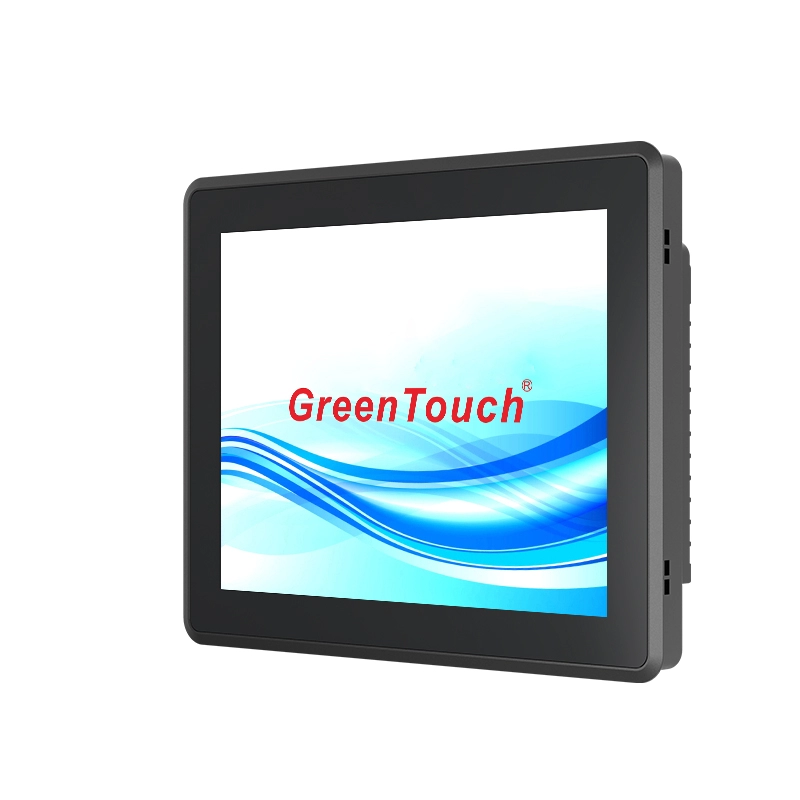
Embedded mounting is usually the first choice when the touchscreen needs to become part of a machine, control cabinet, equipment console, or industrial workstation.
The 3D Series uses locking clips on the rear casing. These clips secure the touchscreen against the front panel or cabinet frame, creating a clean integrated appearance. The monitor sits within the equipment rather than standing separately from it.
This configuration is particularly useful for industrial automation and smart manufacturing equipment. Operators can access the touchscreen directly from the front of the machine, while the monitor housing remains integrated with the overall enclosure.
Embedded installation also helps save surrounding workspace. Instead of allocating additional room for a stand or arm, the monitor becomes part of the machine structure. This is valuable where floor and desk space are limited.
The fully sealed aluminum housing further supports demanding environments. With IP65 front protection, the display is designed to resist water and dust entering through the front, which is useful for equipment exposed to industrial contaminants.
For machine builders, another advantage is the range of available sizes. The 3D Series covers common industrial display dimensions from 10.1 to 23.8 inches, including 10.1", 10.4", 12.1", 13.3", 15", 15.6", 17", 18.5", 19", 21.5", 22", 23.6", and 23.8".
Wall mounting makes more sense when the touchscreen is operated from a fixed location but does not need to be built into a machine.
The 3D Series supports VESA 75 × 75 mm and 100 × 100 mm mounting patterns, allowing it to work with common wall brackets, monitor arms, pole mounts, and ceiling mounting solutions.
This approach can be useful in production lines, laboratories, transportation facilities, retail areas, utility rooms, and public information systems. A wall-mounted monitor can keep the display at a consistent viewing height while leaving tables and work surfaces clear.
Another practical benefit is orientation flexibility. Depending on the bracket and application, the monitor can be installed in either landscape or portrait orientation. This gives system integrators more freedom when designing the user interface and physical workspace.
For example, a landscape display may be suitable for industrial control panels showing process information, while portrait orientation may be more convenient for certain information terminals or specialized interfaces.
When using wall mounting, installers should also consider the position of rear connectors. HDMI, VGA, DP, DVI, audio, and other interfaces are located on the rear and face downward. This helps simplify cable routing when the monitor is installed against a wall or bracket.
Desktop mounting is the most straightforward option when the touchscreen needs to remain movable or when the installation is part of a workstation rather than permanent equipment.
The 3D Series supports standard VESA mounting holes, including 75 × 75 mm and 100 × 100 mm configurations. With a compatible stand or base, the monitor can be installed horizontally or vertically.
This is useful for operator desks, laboratory benches, service stations, training environments, retail counters, and temporary testing setups.
Desktop mounting can also make maintenance easier. A bracket can be removed without modifying the main monitor housing, allowing technicians to reposition or replace the mounting hardware when the workstation layout changes.
For applications where operators interact with the screen frequently, the ability to adjust the monitor's position can be a significant practical advantage.
The easiest way to select between embedded, wall, and desktop mounting is to consider four factors: equipment integration, available space, operator position, and maintenance requirements.
If the touchscreen is part of a machine or control cabinet, embedded mounting is generally the most suitable. It provides a clean equipment interface and avoids the need for a separate support structure.
If the display needs to remain fixed at a particular location while keeping the surrounding surface open, wall mounting is a better option.
If the monitor will be used at a desk, workstation, laboratory bench, or service counter, desktop mounting provides greater flexibility.
The operating environment should also be considered. In industrial applications, a fully enclosed housing, corrosion-resistant construction, and front IP65 protection can be more important than simply choosing the easiest mounting method.
Mounting is only one part of a reliable industrial touchscreen installation. The monitor itself needs to withstand the conditions around it.
The 3D Series Touch Monitoruses a seamless aluminum unibody structure designed for industrial applications. Its enclosed construction helps protect internal components from dust and dirt, while the IP65 front protection provides resistance against water and dust.
The monitor is also designed for continuous operation, with a maximum non-stop operating time of 24/7. Its specified operating temperature range is -20°C to 70°C, making it suitable for many demanding indoor and outdoor equipment environments.
Heat management is another consideration. The rear cover uses a finned heat dissipation structure and does not rely on a cooling fan. This fanless design helps reduce operating noise while supporting heat dissipation.
For touchscreen applications, the display also uses optical bonding between the touch panel and LCD panel. The projected capacitive touch system supports 10-point touch, providing responsive interaction for industrial control and other interactive applications.
A common installation problem is choosing a mounting position first and checking cable access afterward. This can create unnecessary bends, restricted connector access, or difficult maintenance.
The 3D Series provides multiple connectivity configurations, including HDMI, VGA, DP, DVI, audio, microphone, USB Type-B, and DC input depending on the model configuration.
Because the ports are positioned on the rear and face downward, installers should leave enough space behind or below the monitor for cable connection and replacement.
This is particularly important for embedded applications. Before cutting the cabinet opening, system designers should confirm the monitor dimensions, mounting bracket position, connector locations, cable bend radius, and required service clearance.
The mounting method should be considered together with display size.
A 10.1-inch or 12.1-inch monitor may be suitable where cabinet space is limited or where operators need a compact control interface. Larger 18.5-inch, 21.5-inch, 23.6-inch, or 23.8-inch displays can provide more working space for detailed interfaces and information-heavy applications.
The 3D Series supports several aspect ratios, including 16:10, 4:3, 5:4, and 16:9. This allows equipment manufacturers to select a display according to both available installation space and interface requirements.
Brightness is also configurable across different models, with options ranging from 250 to 1000 nits. For bright industrial areas or semi-outdoor environments, a higher-brightness configuration may be more appropriate.
For equipment manufacturers, mounting flexibility becomes even more valuable when the same monitor platform needs to be used across multiple machine designs.
ShenZhen GreenTouch Technology Co.,Ltd. manufactures touch products including capacitive touchscreens, touch monitors, touch all-in-one PCs, infrared touch frames, nano touch foil, and digital signage solutions.
The company operates a 5000 m² standard production workshop and a Class 1000 dust-free lamination workshop, supporting G+G, G+FF, and TP+LCM full lamination processes. Its touch monitor and touch all-in-one manufacturing capabilities support daily production of more than 600 units of touch panels.
GreenTouch also provides customization options for the 3D Series, including size, logo, color, casing, and packaging. This can be useful for OEM and project-based applications where a standard off-the-shelf monitor does not fully match the equipment design.
The company has more than 20 technical engineers, develops more than 50 new products annually, and holds more than 20 patent certificates along with additional software copyrights and certifications. Its products have obtained certifications including CE, FCC, RoHS, CB, EMC, HDMI, and CCC.
There is no universal mounting method that works for every touchscreen application.
Choose embedded mounting when the display needs to become part of a machine or cabinet. Choose wall mounting when the screen needs a fixed position without occupying valuable work surfaces. Choose desktop mounting when flexibility, repositioning, or workstation use is more important.
Regardless of the mounting method, check the mounting pattern, cabinet opening, cable position, viewing angle, ventilation, environmental conditions, and maintenance access before installation.
With its multiple mounting configurations, industrial aluminum housing, optical bonding, 10-point PCAP touch, IP65 front protection, fanless heat dissipation, and 10.1-to-23.8-inch size range, the Panel Mount Touch Monitor 3D Series gives equipment designers a practical platform for building touchscreen interfaces across different industrial and commercial environments.
For projects requiring customized dimensions, casing, branding, or other configuration requirements, working directly with an experienced manufacturer such as ShenZhen GreenTouch Technology Co.,Ltd. can also simplify the transition from monitor selection to final equipment integration.