 RU
RU ZH
ZH IT
IT ES
ES TR
TR JA
JA PT
PT KO
KO FR
FR DE
DE AR
AR ID
ID
How 65 Inch 4K UHD Touch Screen Monitors Enhance Interactive Display Experiences
Learn More



When selecting a touchscreen for an industrial terminal, handheld diagnostic device, or compact control panel, resolution is often one of the first specifications engineers notice. A screen advertised with a resolution of 4096 × 4096 may appear to offer an exceptionally detailed display, but this figure needs to be understood in the context of resistive touch technology. Display resolution, touch positioning accuracy, screen size, and operating environment all affect how well a touch panel performs in a real application.
For equipment designers evaluating a Resistive Touch Screen 2.7 to 10.1 Inches (4 Wire), understanding these distinctions helps prevent specification mismatches and makes it easier to select a panel that fits the intended hardware. The resolution specification is one part of the decision, alongside touch response, surface durability, electrical compatibility, and environmental resistance.
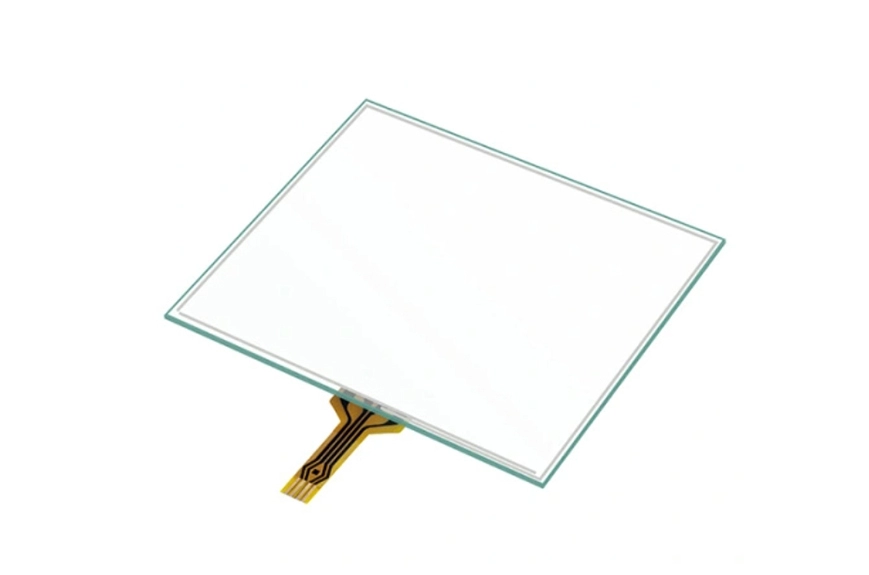
A resolution of 4096 × 4096 describes a coordinate range of 4096 positions along each axis. In a touch-input context, it indicates the number of distinguishable coordinate values available within the reported touch-position range. The theoretical coordinate grid contains more than 16 million possible X-Y combinations.
However, this does not automatically mean that a physical touchscreen can accurately distinguish every adjacent coordinate under all conditions. The actual performance depends on the touch controller, analog-to-digital conversion, panel construction, calibration characteristics, signal processing, and mechanical installation.
It is also important to distinguish touch resolution from display resolution. Display resolution refers to the number of pixels used to render images and text. Touch resolution describes the coordinate granularity used to identify where a person presses the panel. A resistive touch panel may report a 4096 × 4096 coordinate range while being paired with a display that has a different native pixel resolution.
For equipment manufacturers, the practical question is not simply how large the coordinate number looks. It is whether the touchscreen can consistently identify intended input positions across the usable area of the finished device.
On a large interactive display, users generally have more room to select controls. On a compact touchscreen, even a small positioning error can affect the user experience. Buttons, numeric keypads, menu items, and parameter fields often need to fit within a limited space.
A high reported coordinate resolution provides a fine-grained digital representation of touch positions. When combined with suitable controller performance and correct system integration, this can support more precise input mapping for compact interfaces.
For example, a handheld industrial terminal may use a 4.3-inch panel to enter inventory quantities or confirm equipment status. A portable diagnostic device may use a 6-inch screen to select measurement settings, while a small control panel may place several operating functions within a limited interface.
In these applications, engineers should evaluate coordinate consistency across the entire active area rather than relying on the resolution figure alone. Touching near the corners, along the edges, and around small interface controls can reveal issues that a central test point may not identify.
The 4-wire resistive touchscreen range from GreenTouch covers screen sizes from 2.7 to 10.1 inches, making it relevant to compact equipment where space, input reliability, and integration requirements need to be considered together.
A four-wire resistive touchscreen typically uses two conductive layers separated by a small gap. When a user presses the surface, the layers make contact at the touch location. The controller measures the resulting electrical signals to determine the X and Y coordinates.
This physical-pressure operating principle is one reason resistive touchscreens remain useful in industrial and embedded applications. They can respond to a finger, a gloved finger, or a suitable stylus, depending on the panel and controller design. Unlike touch technologies that rely on detecting changes in an electrical field, resistive panels register pressure-induced contact between their conductive layers.
The construction of a panel influences its electrical characteristics, surface feel, optical performance, and durability. GreenTouch specifies two possible structures for its small-size four-wire range: ITO film with ITO glass, and ITO film with ITO film. The appropriate structure depends on the intended design and the required balance of rigidity, flexibility, and integration constraints.
The product has a stated overall thickness of approximately 2.3 mm. For compact terminals and embedded control equipment, a relatively slim panel can help engineers manage the available space within the enclosure. Nevertheless, the complete assembly thickness must also account for the display, adhesive layers, controller, mounting hardware, and other components.
A touchscreen with a 4096 × 4096 coordinate range should not be evaluated on that number alone. Several other factors influence the quality of touch input.
First, controller performance determines how the electrical signals from the panel are converted into coordinates. A stable controller and appropriate signal processing help maintain consistent input under normal operating conditions.
Second, the panel's mechanical installation matters. Uneven pressure, enclosure deformation, incorrect mounting, or excessive stress around the edges may affect touch behavior. A well-designed enclosure should support the panel without placing unintended loads on the active area.
Third, calibration and coordinate mapping must match the requirements of the host system. GreenTouch describes its four-wire products as offering light touch, no drift, and no calibration. For a production design, engineers should confirm the intended meaning of these specifications with the supplier and verify the behavior using the actual controller, operating system, and application software. System-level testing remains important, particularly when the touchscreen is integrated into a custom device.
Finally, the size and layout of interface elements affect practical usability. A fine coordinate grid cannot compensate for buttons that are too small, poorly spaced, or difficult to reach. Interface design should consider the user's working conditions, input method, and expected frequency of operation.
Small touchscreens used in industrial environments may face repeated operation, dust, moisture, oil contamination, and accidental contact with hard objects. These conditions can be as important as coordinate resolution when choosing a panel.
GreenTouch specifies a service life of 1,000,000 touch operations for its small-size four-wire resistive touchscreen range. This figure provides a useful starting point for assessing expected usage, but procurement teams should clarify the test conditions, contact location, applied force, and acceptance criteria associated with the rating.
The product information also identifies a pencil hardness rating of 3H according to ASTM D3363. Pencil hardness is a surface-hardness test and should not be interpreted as a guarantee against every type of scratch or impact. The specified mist hard coating and anti-Newton-ring treatment are intended to address surface protection and optical interference, helping the panel maintain a usable appearance under appropriate operating conditions.
For equipment exposed to contamination, the manufacturer states that the touchscreen can be sealed to support NEMA 4, 4X, or 12 requirements. The actual protection level depends on the completed enclosure, sealing components, assembly methods, and validation testing. Buyers should therefore confirm whether the required rating applies to the finished device or to a specific panel configuration.
These considerations are particularly relevant to handheld industrial terminals, logistics barcode scanners, equipment control interfaces, and portable diagnostic instruments. In such settings, the panel must continue to function as part of the complete device rather than as an isolated component.
The correct screen size depends on the interface layout, available mounting space, and the amount of information displayed at one time. A smaller panel may be appropriate for a dedicated control function, while a larger panel can accommodate more detailed menus and multiple data fields.
GreenTouch lists the following standard sizes for its four-wire resistive touchscreen range:
16:9 or similar widescreen-format options: 2.7, 4.3, 6.2, 7, 9, and 10.1 inches.
4:3-format options: 5.7, 6, 6.5, 9.7 inches.
The exact active area, aspect ratio, outline dimensions, and availability should be confirmed for the selected model before the mechanical design is finalized.
For example, a barcode-scanning terminal may prioritize compact dimensions and a straightforward numeric interface. A portable diagnostic device may need more room for measurement values, while an equipment controller may require a layout that remains readable from a fixed operating position.
Engineers should also consider how the screen will be viewed under the expected lighting conditions, whether the user will wear gloves, and whether the interface must accommodate frequent or repetitive input. These practical requirements help determine whether a particular size and surface finish are suitable.
Electrical and software compatibility should be confirmed early in the development process. GreenTouch states that its four-wire resistive touchscreen solutions can be used with Windows, Android, and Linux systems. The final compatibility depends on the selected controller, available drivers, connection method, and host hardware.
The described connection process involves connecting the extension cable to the driver board, connecting the extension cable to the touchscreen cable, and connecting the driver board to the USB cable. Engineers should follow the wiring instructions supplied for the specific configuration rather than assuming that every panel uses an identical interface.
Before mass production, the development team should verify coordinate orientation, touch response, connector placement, cable routing, and operation after repeated connection and disconnection where applicable. It is also worth checking whether the controller can be accommodated within the enclosure without interfering with other components.
These checks are especially important when integrating a small panel into an existing device. A touchscreen may meet the required coordinate specification but still require adjustments to the controller, cable length, mounting structure, or application software before it can be used reliably.
Standard sizes do not always match the mechanical and electrical requirements of a finished product. GreenTouch offers customization options covering appearance, electrical interfaces, and structural design.
Depending on the application, customization may include screen dimensions, logo placement, flexible printed circuit outlet location, packaging, ITO glass thickness, matte finishing, anti-Newton-ring treatment, anti-glare finishing, smooth finishing, controller selection, and interface configuration. High-temperature, high-humidity, and anti-UV requirements can also be discussed for suitable configurations.
For OEM and industrial equipment projects, these details should be defined before the design is frozen. Changes to the cable outlet, panel dimensions, or mounting arrangement can affect the enclosure and assembly process. Environmental requirements may also influence material selection and qualification testing.
A useful technical inquiry should include the target screen size, required coordinate range, host operating system, controller interface, mounting dimensions, expected operating environment, and estimated service requirements. Providing drawings or interface specifications helps the supplier assess whether a standard configuration is suitable or whether a customized design is needed.
As a professional touch-product manufacturer, ShenZhen GreenTouch Technology Co., Ltd. supplies resistive and capacitive touchscreens, infrared touch frames, touch monitors, and integrated touch computers for different equipment applications.
The company's stated capabilities include a Class 1,000 dust-free lamination workshop, multiple bonding and full-lamination processes, more than 20 technical engineers, and a 5,000-square-meter standard production workshop. It also reports ISO 9001 and ISO 14001 certifications, alongside product certifications including CE, FCC, and RoHS for relevant products. Buyers should verify the certificates and their scope for the specific configuration under consideration.
For a new project, it is useful to discuss the operating environment and system architecture alongside the panel specification. This allows the manufacturer and equipment developer to assess not only the required coordinate range, but also touch response, durability, cable configuration, mechanical fit, and production consistency.
The Resistive Touch Screen 2.7 to 10.1 Inches (4 Wire) is a candidate for compact industrial terminals, handheld diagnostic devices, logistics equipment, and small control panels that require pressure-based touch input. Its stated 4096 × 4096 coordinate range is an important specification, but the final selection should be based on verified system performance and application requirements.
In short, coordinate resolution describes how finely touch positions can be represented; it does not independently determine real-world accuracy. By evaluating the controller, panel construction, surface durability, screen dimensions, and integration requirements together, equipment manufacturers can make a more informed decision and reduce avoidable problems during product development.