 RU
RU ZH
ZH IT
IT ES
ES TR
TR JA
JA PT
PT KO
KO FR
FR DE
DE AR
AR ID
ID
The Difference between LED and LCD
Learn More



Large interactive displays are increasingly used in meeting rooms, classrooms, retail environments, and public information areas. However, a large screen alone does not guarantee a smooth interactive experience. When several people need to write, select information, move objects, or work with digital content on the same display, the touch system must respond accurately to multiple inputs without making the interface difficult to use.
For display manufacturers and system integrators, choosing the right touch technology involves more than checking screen dimensions. The number of supported touch points, response time, surface material, controller connection, and software compatibility all influence the final result. A 20-point projected capacitive touch solution can provide a practical foundation for applications that require simultaneous touch input.
The Interactive Touch Foil 32 to 65 Inches (XTA Series) from GreenTouch is designed for this type of integration. Using an ultra-thin transparent PET film, the XTA Series supports 20-point PCAP touch and can be applied to compatible glass, acrylic, and polycarbonate surfaces. This allows manufacturers to add interactive functionality to display structures without relying on a conventional visible touch frame.
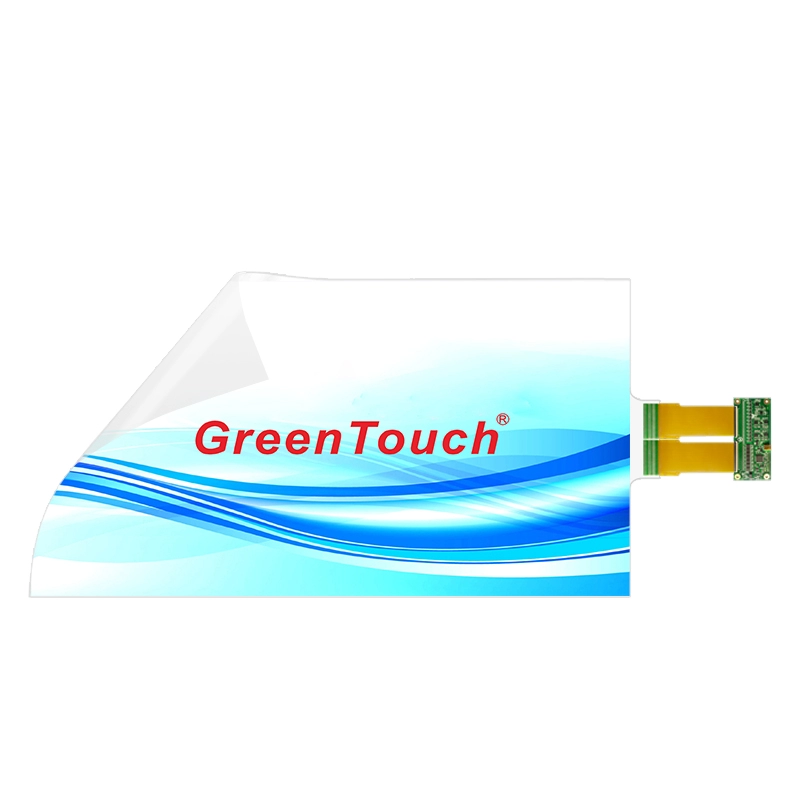
Projected capacitive, or PCAP, technology detects touch through changes in the electrical field around a sensor grid. In a touch foil, this sensing structure is formed by conductive patterns arranged along the X and Y axes. A controller interprets the signals and determines the positions of detected touches.
A 20-point touch specification indicates support for up to 20 simultaneous touch points under the product's specified operating conditions. This capability can be useful when an application needs to recognize multiple fingers at once rather than processing only one or two contacts.
For example, a collaborative whiteboard may allow several participants to write or manipulate objects simultaneously. An interactive product display may let visitors explore different sections of an interface, while a public information terminal can support touch gestures such as zooming, rotating, or navigating between content areas.
However, the maximum touch-point count is only one part of the system. The application software must also recognize and handle simultaneous input correctly. The operating system, controller, display configuration, and interface design should all be tested together before deployment.
A large touchscreen creates more room for collaboration, but the software layout determines whether that space is used effectively.
In a meeting room, for instance, two participants may need to annotate separate areas of a shared presentation. If the interface forces everyone to work in one small central region, the physical size of the display offers limited practical benefit. Designers should instead allocate enough working space for independent actions and make important controls easy to reach.
The same principle applies to educational displays. Teachers and students may need to write equations, move diagrams, compare images, or arrange learning materials. A multi-touch interface should distinguish useful gestures from accidental contacts and provide clear visual feedback when an action is recognized.
Retail and commercial applications have different priorities. An interactive storefront may use touch input to explore product information, while a digital advertising display could provide navigation between campaign content and product details. In these cases, the interface should remain understandable for first-time users and respond consistently to common gestures.
When planning a system around the XTA Series interactive touch foil, start by identifying the actions users need to perform. Determine whether the application genuinely benefits from many simultaneous contacts, or whether a smaller number of touch points would be sufficient. This helps ensure that the touch hardware and software are selected according to actual operating requirements.
One advantage of touch foil is that it can be integrated behind a transparent surface instead of requiring a traditional touch frame around the display.
The XTA Series uses a transparent PET film approximately 0.2 mm thick and is designed for compatible glass, acrylic, and polycarbonate applications. This makes it suitable for projects where designers want to retain a clean front appearance while adding touch functionality.
Material selection should take place early in the project. Glass may be appropriate for commercial display panels and interactive windows, while acrylic and polycarbonate may suit particular enclosure designs or applications with different weight and fabrication requirements. The final result depends on the material's thickness, surface condition, construction, and compatibility with the touch system.
The installation surface must also be clean, flat, and dry before application. Dust, fingerprints, trapped air, and uneven adhesion can affect the finished appearance and may interfere with the consistency of the installation. Integrators should follow the manufacturer's mounting instructions and evaluate the actual material combination before committing to production.
Curved installations require additional attention. Although the XTA Series supports straight and curved applications, the permitted curvature and installation conditions should be confirmed for the selected size and substrate. A design that works on a flat glass panel should not automatically be assumed to perform identically on every curved surface.
Touch response is especially important when multiple people interact with the same display. Delayed feedback can make handwriting feel disconnected from finger movement, while inconsistent positioning can make small controls difficult to select.
The XTA Series specifies a response time of less than 8 milliseconds. This is a useful reference when evaluating the touch component, but it should not be confused with the complete system's end-to-end latency. The display, computer, operating system, graphics processing, and application software can all contribute to the time between a physical touch and the resulting visual response.
Touch accuracy should be assessed in the context of the intended interface. Large navigation buttons may tolerate minor positional variation, while drawing tools, detailed diagrams, and precision selection tasks require more careful evaluation.
During testing, integrators should check touch recognition across the active area, verify the behavior of simultaneous contacts, and confirm that calibration remains suitable after installation. Tests should include the gestures users will perform most often, rather than relying exclusively on a demonstration of basic tapping.
The XTA Series also specifies a light transmittance of at least 93%. This supports the goal of maintaining display visibility through a transparent touch layer. Nevertheless, the optical performance of the complete assembly will depend on the display, substrate, bonding process, and surrounding lighting conditions.
A multi-touch foil needs a controller and a compatible host system to convert sensor signals into usable input. Planning this connection correctly can prevent avoidable integration problems.
The XTA Series uses a USB 2.0 full-speed interface, with a stated transmission rate of up to 480 Mbps. The listed package includes one touch foil, one controller, and one USB cable. The product documentation describes compatibility with Windows, Android, and Linux.
Before installation, verify that the selected host computer supports the intended operating system and touch-input configuration. Application-specific requirements should also be checked, particularly when the system uses custom software, embedded hardware, or a specialized operating-system build.
Calibration is another important step. After connecting the flexible printed circuit, or FPC, to the controller and connecting the controller to the host, follow the applicable setup procedure to calibrate the touch coordinates. Confirm that the displayed touch position corresponds to the physical point of contact across the active area.
Although the product documentation describes a driver-free connection process, the exact setup requirements may vary with the host platform and configuration. Confirm the applicable instructions before integrating the foil into a production system.
The appropriate touch foil size depends on the display dimensions, the viewing distance, the number of users, and the available installation space.
The XTA Series is available in 32-, 40-, 42-, 43-, 46-, 47-, 49-, 55-, and 65-inch sizes, using a 16:9 format. A 32-inch display may suit a compact interactive station or a smaller collaboration area, while larger formats can provide additional room for simultaneous activities and more complex interfaces.
However, choosing a larger screen does not automatically improve usability. If users must reach across the display frequently, the interface should be organized to minimize unnecessary movement. Controls used most often should be positioned within comfortable reach, and interactive elements should remain large enough for reliable selection.
Mechanical dimensions also need to be checked carefully. The touch film must align with the intended active area, and the controller and FPC require sufficient space within the display assembly. Cable routing, access for servicing, and the method of securing the substrate should be included in the design review.
For projects involving customized dimensions, logos, or installation services, confirm the available options with the supplier before finalizing the enclosure and display structure.
Interactive displays installed in public spaces face different operating conditions from those used in controlled meeting rooms. They may be exposed to frequent handling, fingerprints, cleaning procedures, and accidental contact.
The XTA Series lists IP67 waterproof protection, vandal-resistant characteristics, and resistance to pollution. These features can be relevant when evaluating touch solutions for public-facing installations. However, the protection rating of a touch component does not automatically establish the rating of the complete display or enclosure. The final assembly must be evaluated according to its own construction and applicable test requirements.
Surface treatments can also be selected according to project needs. Available customization options include anti-glare (AG), anti-fingerprint (AF), and anti-reflective (AR) treatments. Each serves a different purpose, so the choice should reflect the lighting conditions, cleaning routine, and visual requirements of the installation.
For example, an interactive display facing strong ambient lighting may benefit from a suitable glare-management approach, while a frequently handled public interface may require greater attention to fingerprint visibility and cleaning procedures. The selected treatment should be verified for its effect on transparency, touch performance, and the overall appearance of the finished assembly.
A successful multi-touch project depends on the touch component as well as the manufacturing and technical support behind it. For OEMs and system integrators, useful evaluation points include product consistency, controller compatibility, customization capabilities, documentation, and the supplier's ability to support installation questions.
ShenZhen GreenTouch Technology Co.,Ltd. manufactures touch-related products, including capacitive and resistive touch screens, infrared touch frames, touch monitors, interactive touch foil, and touch all-in-one PCs. The company reports ISO 9001 quality management system certification and ISO 14001 environmental management system certification. Its listed product-related certifications include CE, FCC, and RoHS, subject to the applicable product.
GreenTouch also reports a Class 1000 dust-free lamination workshop, experience with multiple bonding techniques, more than 20 technical engineers, and annual development of more than 50 new products. These manufacturing and development resources are relevant when assessing a supplier for projects that require customized dimensions, surface treatments, or integration support.
Before confirming a design, buyers should request the specifications relevant to their chosen foil size, review the controller and host-system requirements, and arrange sample testing with the intended substrate. A practical evaluation should include touch accuracy, multi-point operation, optical appearance, calibration, and the mechanical fit of the complete assembly.
Twenty-point PCAP touch can provide a useful foundation for large interactive interfaces, but its practical value depends on how the entire system is designed. The number of touch points, software behavior, substrate compatibility, response characteristics, and installation quality all contribute to the user experience.
The Interactive Touch Foil 32 to 65 Inches (XTA Series) combines a thin transparent PET structure, 20-point touch support, a response time of less than 8 milliseconds, and compatibility with glass, acrylic, and polycarbonate. Its available sizes and customization options make it worth evaluating for interactive windows, digital signage, educational displays, and collaborative interfaces.
For equipment manufacturers and integrators, the most effective starting point is to define the intended user interactions, select the appropriate display and substrate, and validate the controller and software together. These steps help turn a touch specification into a practical, maintainable interactive system.
For project-specific requirements, GreenTouch can be consulted regarding available sizes, customization options, installation methods, and compatibility considerations. Reviewing these details before production helps ensure that the selected XTA Series touch foil matches the physical design and intended user experience.