 RU
RU ZH
ZH IT
IT ES
ES TR
TR JA
JA PT
PT KO
KO FR
FR DE
DE AR
AR ID
ID
Life Cycle Carbon Footprint Assessment and Green Manufacturing of Industrial All-in-One Touch PCs
Learn More



Outdoor charging stations are often installed in parking lots, commercial buildings, residential communities, and public service areas where equipment must remain accessible in changing weather conditions. Their touchscreens need to support clear instructions and reliable user interaction while fitting securely into the station enclosure. Selecting a suitable touch panel therefore involves more than checking screen size or touch accuracy. Equipment manufacturers must also consider water and dust protection, sunlight exposure, electrical connections, mounting structure, and compatibility with the control system.
The Waterproof IR Touch Screen 10.4 to 21.5 Inches (TE Series) from GreenTouch is designed for equipment that requires infrared touch control in demanding environments. With an IP65-rated structure, tempered glass surface, USB connectivity, and support for Windows, Android, and Linux, the TE Series provides an option for manufacturers developing outdoor charging stations and other self-service equipment.
An outdoor charging station typically combines a display, touch interface, control board, power system, communication module, and protective enclosure. Each component has its own operating requirements, and the touchscreen must work reliably within the complete assembly.
For example, a charging station installed in a covered parking area may face less direct rainfall than one positioned in an exposed public parking lot. Both installations can experience temperature changes, dust, sunlight, and repeated user interaction. The enclosure design and installation method determine how these conditions affect the touchscreen.
Before selecting a touch panel, equipment developers should establish several requirements:
The dimensions of the available display opening and the intended viewing area.
The expected exposure to rain, dust, sunlight, and temperature changes.
The control system and operating system used by the charging station.
The required touch functions and the response expected from the user interface.
The method of fixing the touchscreen and sealing it against the enclosure.
The accessibility of USB connections and other components during maintenance.
Defining these requirements early helps reduce redesign work during prototype development and makes it easier to evaluate whether a particular touchscreen is suitable for the finished product.
Water and dust can affect electronic equipment when protective structures are poorly designed or installed. In outdoor charging stations, the touchscreen is part of the enclosure interface, so its protection rating must be considered alongside the design of the surrounding housing.
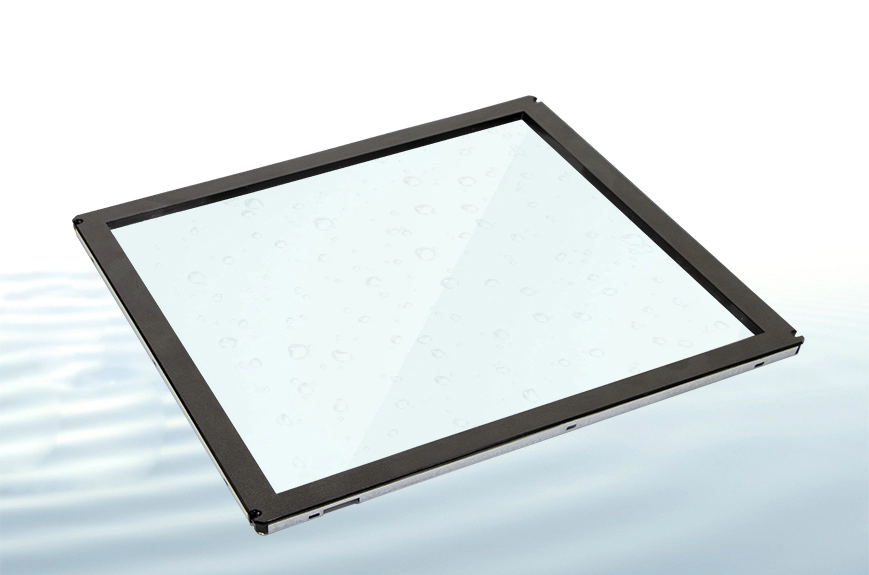
The TE Series features an IP65 waterproof and dustproof rating. This rating indicates protection against dust ingress and water jets under the specified test conditions. It does not mean that the touchscreen is suitable for immersion or that the entire charging station automatically achieves IP65 protection after installation.
The TE Series uses a one-piece injection-molded light-transmitting frame, waterproof adhesive, and a mechanized glass-bonding process. These structural features are relevant when evaluating how the touch panel integrates with an outdoor equipment enclosure.
During product development, manufacturers should pay attention to the interface between the touchscreen and the housing. Uneven mounting surfaces, unsuitable adhesives, poorly routed cables, or gaps around the installation opening can undermine the protection of the complete assembly.
The GreenTouch TE Series waterproof infrared touchscreen can serve as a component option for outdoor charging equipment, but the final enclosure should be tested under the intended installation conditions. Testing should cover the complete assembly, including cable entry points, seams, fasteners, and any service openings.
Charging stations often require users to select charging modes, confirm instructions, enter account information, or navigate payment and authentication screens. The touch technology must support these interactions while remaining compatible with the equipment's software.
The TE Series uses 10-point infrared touch technology. Infrared touch systems detect interruptions in an infrared sensing field around the display area, allowing touch input without relying on a conventional capacitive sensing layer beneath the glass.
This approach can be useful for equipment that requires a protective glass surface and a clearly defined touch area. The TE Series also uses a 3 mm tempered glass cover, which provides a protective front surface for public-facing installations.
When evaluating the glass and touch configuration, manufacturers should consider the intended interaction style. A charging interface that mainly uses large on-screen buttons and step-by-step instructions has different usability requirements from one that displays detailed maps or requires frequent text entry.
Testing should include repeated selections, edge-of-screen interactions, and simultaneous touch inputs where relevant to the application. Developers should also verify that the charging station's software correctly interprets touch events and prevents unintended selections during normal operation.
Charging stations may be installed in locations where the touchscreen receives direct sunlight or strong reflected light from nearby surfaces. These conditions can affect the visibility of on-screen instructions and make it harder for users to operate the equipment comfortably.
The TE Series specifies full-angle light resistance and resistance to ambient light up to 8,000 lux. This specification provides a useful reference when assessing whether the touch sensor is suitable for a particular environment. However, touch-sensor light resistance and display readability are separate considerations.
A touchscreen may continue to register touch inputs under strong ambient light while the underlying display remains difficult to read. Screen brightness, reflections, viewing angle, display contrast, and the position of the equipment all influence the user experience.
For this reason, manufacturers should test prototypes under representative lighting conditions. A charging station installed outdoors may need to be evaluated at different times of day and from the angles at which users approach the interface.
The enclosure design can also help. Positioning the display away from strong reflections, selecting appropriate screen settings, and designing clear interface graphics can improve usability without relying on the touch panel alone.
Touchscreen integration should be straightforward for the equipment's control system. Complex driver requirements or uncertain compatibility can increase development time, particularly when a manufacturer supports several charging station models.
The Waterproof IR Touch Screen TE Series uses a USB 2.0 full-speed interface and supports plug-and-play operation without a separate touch driver under supported configurations. Its stated interface transmission speed is up to 480 Mbps.
The product is designed for compatibility with Windows, Android, and Linux systems. This provides flexibility for equipment manufacturers using different control boards and software platforms, although actual compatibility should be verified with the specific host hardware and operating system version.
During prototype testing, engineers should confirm that the host system recognizes the touch interface correctly, that touch coordinates align with the displayed user interface, and that input remains stable after repeated restarts. If the charging station uses a customized operating system, the engineering team should test the complete software configuration rather than relying on general operating system compatibility alone.
Cable routing also deserves attention. The USB connection must remain secure inside the enclosure, with sufficient clearance for installation and servicing. Cables should be positioned so that they do not interfere with sealing surfaces or become strained when the housing is assembled.
The right touchscreen size depends on the enclosure dimensions, user interface layout, viewing distance, and the amount of information shown on the screen. A larger display may provide more room for instructions and controls, but it also requires more installation space and may affect the overall equipment design.
The TE Series is available in several size and aspect-ratio configurations:
10.4, 12.1, and 15 inches in a 4:3 ratio.
17 and 19 inches in a 5:4 ratio.
21.5 inches with the aspect ratio specified in the product documentation.
Manufacturers should confirm the exact dimensions and aspect ratio of the selected model before finalizing the enclosure. The visible screen area, overall panel dimensions, bezel coverage, and mounting clearances are not interchangeable measurements.
For compact charging stations with limited front-panel space, a smaller touchscreen may be sufficient for basic charging instructions and a small number of controls. Larger interfaces may be more suitable when the system needs to display detailed charging information, multiple navigation steps, or additional service functions.
The best approach is to build a representative front-panel prototype and test it with the actual interface. This allows the engineering team to assess text readability, button spacing, touch accuracy, and the physical fit before committing to production tooling.
A touchscreen's specifications do not guarantee successful integration if the mounting structure is poorly designed. The panel must be aligned correctly with the viewing window, held securely in place, and integrated with the enclosure's sealing system.
The TE Series features an aluminum alloy frame and an approximately 8 mm ultra-narrow bezel. These characteristics can support a compact front-panel design where space is limited.
The manufacturer's installation guidance includes connecting the USB interface to the host, checking recognition, applying double-sided tape to the back, aligning the panel with the viewing window, and securing it in position. This process offers a straightforward mounting approach for suitable configurations.
However, equipment manufacturers should determine whether the recommended mounting method meets the mechanical and environmental requirements of the finished charging station. Applications exposed to vibration, frequent servicing, or demanding outdoor conditions may require additional structural support or a different enclosure-specific mounting arrangement.
Before production, verify the panel alignment, cable clearance, adhesive compatibility, and accessibility of internal components. After assembly, test touch operation and the protection of the complete enclosure. Any changes to the mounting arrangement should be evaluated to ensure they do not compromise the intended sealing performance.
Charging station manufacturers may need to adapt the touchscreen to their own product appearance and installation requirements. Standardized screen dimensions are useful, but the surrounding bezel, surface treatment, and branding can also affect the finished equipment.
GreenTouch lists customization options for the TE Series, including logo, size, border color, border material, and AG, AR, and AF surface treatments.
These options can help manufacturers coordinate the touchscreen with the charging station's front panel and intended operating environment. For example, a customized border may suit a particular enclosure design, while a selected surface treatment may address specific requirements for reflection, cleaning, or surface appearance.
The engineering team should confirm which options are available for the selected model and whether customization affects lead time, minimum order quantities, tooling, or validation requirements. It is also advisable to approve a sample before placing a production order, especially when the touchscreen is part of a newly developed enclosure.
For OEM projects, touchscreen procurement involves more than identifying a suitable component. Manufacturers may also need technical communication, consistent production, customization support, and documentation for their quality and compliance processes.
ShenZhen GreenTouch Technology Co., Ltd.specializes in touch products, including infrared touch frames, capacitive and resistive touchscreens, touch monitors, all-in-one PCs, and digital signage. The company reports ISO 9001 quality management system and ISO 14001 environmental management system certifications, along with product-related certifications including CE, FCC, CB, RoHS, UL, and CCC.
Its reported manufacturing resources include a 5,000-square-meter standard production workshop, a Class 1000 dust-free lamination workshop, and a 2,000-square-meter warehouse area across Huizhou and Shenzhen. The company also reports more than 20 patent certificates, more than 30 software copyrights, and a technical team supporting product development.
For charging station projects, buyers should request the technical drawings, applicable model-specific certifications, mounting specifications, and test documentation needed for their own design review. They should also confirm operating conditions, customization details, sample availability, and after-sales support before finalizing the touchscreen specification.
Before adopting an infrared touchscreen for an outdoor charging station, review the following items:
Environmental protection: Confirm the IP65 rating and validate the complete enclosure after installation.
Touch performance: Test the 10-point infrared interface under expected lighting and operating conditions.
Glass and structure: Verify the glass dimensions, bezel coverage, mounting method, and mechanical support.
System compatibility: Test USB recognition and touch behavior with the actual Windows, Android, or Linux configuration.
Screen dimensions: Match the selected size and aspect ratio to the enclosure and user interface.
Cable management: Provide secure connections, adequate clearance, and practical maintenance access.
Customization and validation: Approve the final configuration and complete the required testing before mass production.
Selecting a touchscreen for an outdoor charging station requires coordinated decisions about environmental protection, mechanical design, connectivity, and user interaction. Evaluating these factors together helps equipment manufacturers identify integration issues before production and build interfaces suited to real operating conditions.
For projects that require a protected infrared touch interface in a range of screen sizes, the Waterproof IR Touch Screen 10.4 to 21.5 Inches (TE Series) from ShenZhen GreenTouch Technology Co., Ltd. is an option worth evaluating against the project's enclosure design and operating requirements.