 RU
RU ZH
ZH IT
IT ES
ES TR
TR JA
JA PT
PT KO
KO FR
FR DE
DE AR
AR ID
ID
4-Wire vs 5-Wire Resistive Touch Screen: What Buyers Need to Know
Learn More



When an OEM equipment manufacturer starts selecting a panel PC, the first question is often the display size. However, size is only one part of the decision. The panel PC also needs to fit the cabinet or machine structure, provide sufficient computing performance, support the required operating system, communicate reliably with other devices, and remain stable under the expected working conditions.
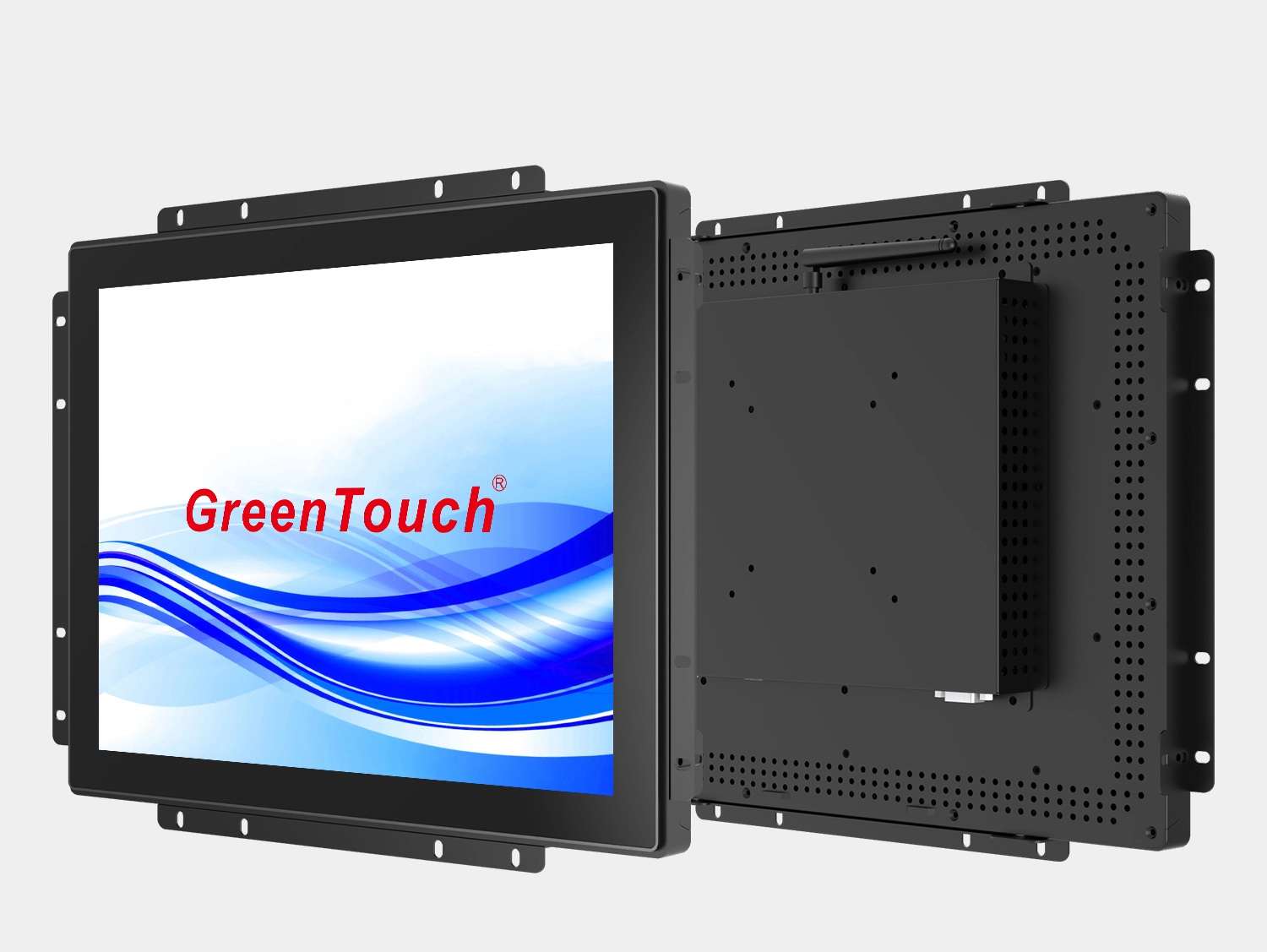
For equipment that needs an integrated touchscreen rather than a separate monitor and computer, the Open Frame Touch Panel PC 7-55 Inches (2C Series) provides a flexible platform with multiple screen sizes, Android operation, industrial-oriented construction, and several mounting configurations.
The 2C series is available from 7 inches to 55 inches, making it suitable for compact control interfaces as well as larger information and interactive display applications. For OEM projects, this range allows manufacturers to select a screen that matches the physical dimensions and viewing requirements of the finished machine instead of redesigning the equipment around a limited display format.
Before selecting a processor or resolution, OEM buyers should determine how the panel PC will be installed.
The 2C series supports embedded, wall-mounted, and desktop installation. For equipment manufacturers, embedded mounting is particularly useful when the touchscreen needs to become part of a cabinet or machine panel.
The panel PC comes with an external bracket and mounting screw holes for recessed installation. Its small-frame structure and 3.5 mm low-profile raised edge help create a clean installation around the display opening. This is useful for control cabinets, industrial workstations, self-service equipment, and other systems where the touchscreen needs to sit securely within the equipment structure.
For installations where the display cannot be recessed, the 2C series also supports VESA mounting. Depending on the configuration, mounting interfaces include 75×75 mm, 100×100 mm, 200×100 mm, and 400×400 mm patterns. The display can be installed horizontally or vertically using suitable mounting hardware.
Desktop installation is another option when the panel PC is used at a workstation, service counter, or equipment operating station.
This flexibility is one reason OEM buyers should consider the mounting method early. A panel PC may have suitable specifications on paper but still create unnecessary mechanical work if its mounting structure does not match the equipment.
The 7-55 inch range gives OEM manufacturers considerable flexibility.
Smaller models such as 7-inch and 8-inch displays can work where space is limited and the interface only needs to show essential operating information. Medium sizes such as 13.3, 15.6, 21.5, 23.8, or 27 inches provide more room for control panels, dashboards, production data, and interactive interfaces.
Larger 32, 43, 50, and 55 inch models can be considered when the display needs to be visible from a greater distance or present more information at once.
The series supports different aspect ratios, including 16:9, 16:10, 4:3, and 5:4, depending on the selected size. Available resolutions include 1920×1080, 1680×1050, 1280×800, 1366×768, 1024×768, and 800×600 at 60 Hz.
This variety is practical for OEM projects because existing equipment may already have a fixed panel opening or a software interface designed around a particular screen proportion.
The computing platform is another important consideration.
The Open Frame Touch Panel PC 7-55 Inches (2C Series) uses Rockchip RK3566, RK3568, or RK3588 processor options. These quad-core platforms operate at a main frequency of 1.8 GHz and are designed to provide a balance between computing performance and power consumption.
OEM manufacturers can select the processor configuration according to the software and workload of the finished equipment.
A relatively straightforward equipment interface may not require the same processing capability as a system running more complex applications, multiple data views, network communication, or multimedia content. Choosing an appropriate processor prevents the equipment from being unnecessarily over-specified while still leaving enough performance for the intended application.
The 2C series supports Android and offers optional 2 GB, 4 GB, or 8 GB RAM, with 32 GB or 64 GB SSD configurations. TF card support provides another option for storage expansion or application requirements.
Connectivity should be evaluated together with the equipment's control architecture.
The 2C series provides HDMI, DC 12V input, LAN, TF, power, audio output, and USB interfaces. These ports are positioned on the rear of the display and face downward, which can make cable routing more convenient when the unit is installed inside equipment.
For network-connected equipment, the built-in gigabit Ethernet port supports higher-speed wired data transmission. The panel PC also includes 802.11b/g/n Wi-Fi, while network configurations can support Ethernet, Wi-Fi/Bluetooth 4.0 and optional 3G, 4G, or 5G connectivity depending on the configuration.
For example, a smart manufacturing terminal may need to communicate with a factory network, while a logistics terminal may need wireless connectivity to exchange information with a warehouse management system. These requirements should be identified before the enclosure and wiring layout are finalized.
OEM equipment is often deployed in environments that are less controlled than an office.
Dust, water exposure, temperature changes, continuous operation, and electromagnetic interference can all affect the reliability of a touchscreen computer.
The 2C series uses front protection rated IP65 for resistance to dust and water. It also incorporates IK08 protection and EMC anti-interference design. Its operating temperature range is -20°C to 70°C, while the storage temperature range is -30°C to 80°C.
For equipment that needs to operate continuously, the series is designed for maximum non-stop 24/7 operation. Dense ventilation holes are incorporated into the structure to support heat dissipation during extended operation.
These specifications should still be evaluated against the actual enclosure and installation environment. A panel PC's rated operating range does not eliminate the need for proper cabinet ventilation, heat management, and appropriate installation.
For an OEM control interface, the touch function can be just as important as the LCD.
The 2C series uses an optically bonded touch panel and LCD panel. It supports projected capacitive 10-point touch, providing sensitive response and accurate touch positioning.
Optical bonding can also help create a more integrated display structure, while the sealed small-frame design is suitable for embedded cabinet installation.
Brightness is another factor when selecting the configuration. Depending on the model, brightness options range from 250 to 1,000 nits. An OEM manufacturer should select brightness according to the installation environment rather than automatically choosing the highest specification.
A machine installed indoors under controlled lighting may require a different display configuration from equipment positioned near strong ambient lighting.
For OEM projects, the first unit is rarely the only unit that matters. Manufacturers need to consider what happens after the initial development stage.
A suitable supplier should be capable of supporting product development, sample evaluation, production, quality control, and subsequent supply. This is especially important when the touch panel PC becomes part of a standard equipment platform.
ShenZhen GreenTouch Technology Co., Ltd. focuses on touch products and develops capacitive and resistive touch screens, touch monitors, touch all-in-one PCs, digital signage, and related touch solutions. The company operates a 5,000-square-meter standard production workshop and a Class 1000 dust-free lamination workshop, with G+G, G+FF, and TP+LCM full-lamination capabilities.
Its R&D team includes more than 20 technical engineers, while the company reports more than 20 patent certificates and more than 30 computer software copyrights. It also maintains warehouse facilities in Huizhou and Shenzhen with a combined area of approximately 2,000 square meters.
For OEM customers, these capabilities can be relevant when the project requires repeated production rather than a one-time display purchase.
There is no single ideal size or configuration for every OEM system.
A compact industrial controller may benefit from a 7-inch or 8-inch model, while a production workstation could require a 15.6-inch or 21.5-inch touchscreen. A logistics dashboard or intelligent infrastructure terminal may need a larger 32-inch, 43-inch, or 55-inch display.
The same principle applies to processor selection, memory, storage, brightness, mounting, and connectivity. These specifications should be selected according to the equipment's actual interface, operating environment, software workload, and installation constraints.
For smart manufacturing, the 2C series can serve as an interactive equipment interface. In smart retail and catering, different screen sizes can support ordering, information display, or self-service functions. Medical informatics, smart logistics and warehousing, and intelligent infrastructure can also require different combinations of screen size, networking, mounting, and computing performance.
The advantage of a broad product range is that the OEM manufacturer can select a configuration rather than forcing every project into the same hardware specification.
Before confirming an order, OEM engineers should verify several points:
Selecting an OEM panel PC becomes much easier when these factors are evaluated together rather than choosing a display based only on screen size or processor specifications.
For equipment manufacturers looking for a flexible Android-based platform across different machine designs, the 2C Series combines multiple display sizes, processor options, mounting methods, connectivity configurations, and industrial-oriented protection in one product family. That makes the Open Frame Touch Panel PC 7-55 Inches (2C Series) a practical option for OEM equipment that needs an integrated computing and touch interface.