 RU
RU ZH
ZH IT
IT ES
ES TR
TR JA
JA PT
PT KO
KO FR
FR DE
DE AR
AR ID
ID
Why OEM Buyers Still Choose Resistive Touch Screens for Stable, Cost-Effective Performance
Learn More



Integrating a touchscreen into an industrial cabinet is different from installing a standard desktop monitor. The display has to fit the available panel opening, provide reliable mounting points, leave enough space for cables and connectors, and continue operating under the temperature and operating conditions of the equipment. For OEM manufacturers, the touchscreen is therefore part of the machine structure rather than simply a display component.
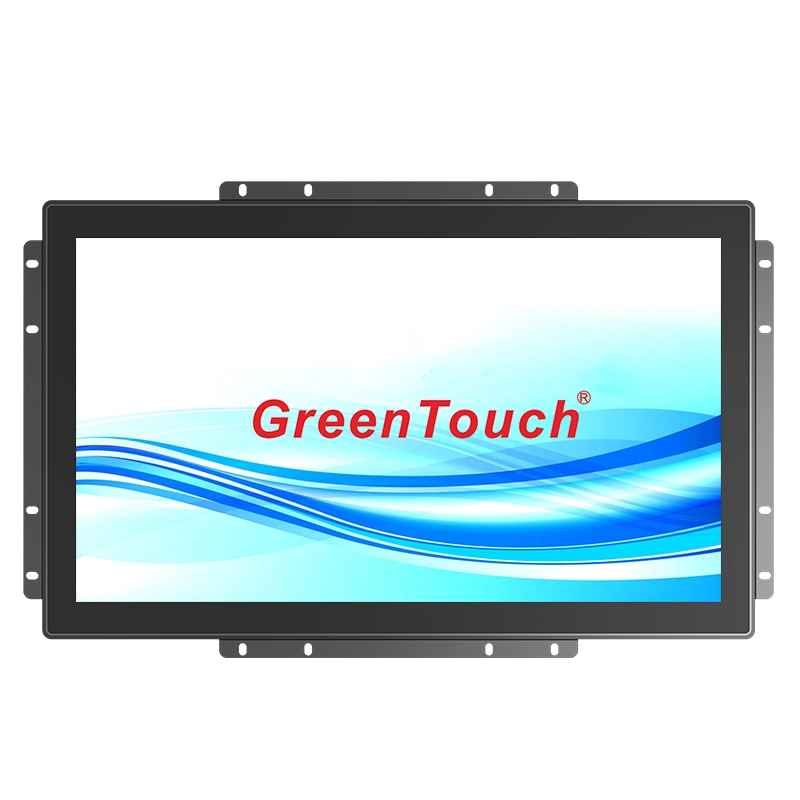
The Open Frame Touch Monitor 7-55 Inches(2C Series) is designed for this type of integration. With sizes from 7 to 55 inches, multiple aspect ratios, capacitive 10-point touch, several video interfaces, and embedded mounting support, the 2C Series can be adapted to industrial cabinets, control equipment, self-service terminals, healthcare devices, and other integrated systems.
The first step in touchscreen integration is not selecting the operating system or interface. It is confirming the physical dimensions available inside the cabinet.
The 2C Series covers a particularly broad size range, including 7, 8, 9.7, 10.1, 10.4, 12.1, 13.3, 14, 15, 15.6, 17, 18.5, 19, 21.5, 22, 23.6, 23.8, 27, 32, 43, 50, and 55 inches.
This range gives equipment designers considerably more flexibility than a single-size monitor platform. Compact control equipment may use a 7-inch to 15-inch model, while larger operator interfaces or public-facing terminals can use 21.5-inch, 27-inch, 32-inch, 43-inch, 50-inch, or 55-inch versions.
The available aspect ratios also need to be considered. The series includes 4:3, 5:4, 16:9, and 16:10 formats. Matching the aspect ratio with the cabinet opening helps prevent unnecessary changes to the front panel and avoids excessive unused space around the display.
For an OEM project, the practical approach is to define the cabinet opening first, then select the closest display size and confirm the external dimensions, mounting holes, cable clearance, and bezel area before finalizing the mechanical design.
The main advantage of an open frame monitor is that it can become part of the equipment enclosure.
The 2C Series Open Frame Touch Monitor is supplied with an external mounting bracket featuring screw holes for recessed installation. This allows the monitor to be positioned behind a cabinet panel rather than sitting on a separate desktop stand.
For industrial equipment, this structure can simplify front-panel design. The cabinet manufacturer can create an opening that matches the selected display and secure the monitor using the supplied mounting structure.
The installation also keeps the overall appearance clean. Instead of placing a complete commercial monitor inside the cabinet, the open frame construction allows the display to be integrated directly into the machine's front surface.
This is particularly useful for control cabinets, industrial terminals, self-service equipment, medical devices, and other products where the screen needs to appear as a built-in component.
Before production, engineers should verify the cabinet cutout, bracket position, screw-hole dimensions, display depth, and cable routing. These details are more important to installation success than the screen diagonal alone.
Cable routing can become a problem when a monitor is installed inside a shallow cabinet. Rear connectors that point directly toward the back wall may require additional clearance or force the cabinet to become deeper.
The 2C Series places its major connections on the rear and facing downward. Depending on the configuration, available interfaces include HDMI, VGA, DVI, DP, MIC, AUDIO, USB, DC input, and earphone connections.
Two common interface combinations are VGA+DVI+HDMI and VGA+HDMI+DP.
The downward-facing layout gives installers more flexibility when routing cables inside a cabinet. Cables can be guided toward the lower section of the enclosure rather than extending horizontally into limited rear space.
This is especially useful when the monitor is installed close to the rear cabinet wall. However, the final cabinet design should still reserve enough space for connectors, cable bending radius, ventilation, and maintenance access.
Although embedded installation is the key strength of an open frame display, the 2C Series also supports wall-mounted and desktop configurations.
For wall mounting, the monitor supports VESA mounting patterns including 75 × 75 mm, 100 × 100 mm, 200 × 100 mm, and 400 × 400 mm depending on the model. This makes the same product family suitable for monitor arms, wall brackets, ceiling mounts, pole mounts, and other compatible mounting systems.
Desktop installation uses VESA mounting brackets. The brackets can be installed horizontally or vertically depending on the equipment configuration.
This flexibility can be useful during product development. A manufacturer may use an embedded configuration for the final machine while using a desktop bracket during testing, demonstration, or maintenance.
The ability to use different mounting methods also reduces the need to develop completely different monitor structures for different equipment versions.
Mechanical integration is only one part of the design. The touchscreen must also provide an appropriate interaction method for the equipment.
The 2C Series uses projected capacitive 10-point touch technology with an optically bonded touch panel and LCD panel. Optical bonding helps combine the touch layer and display into a more integrated assembly and can improve the visual and touch experience compared with a separated structure.
Ten-point touch support allows the interface to recognize multiple touch points. For industrial control applications, this can support more flexible interface operations such as menu selection, navigation, zooming, and other multi-touch functions when supported by the software.
The monitors support Windows, Android, and Linux systems, giving OEM developers flexibility when selecting the computing platform for their equipment.
A touchscreen installed in industrial equipment may operate for extended periods without being switched off. The 2C Series uses industrial-grade LCD panels and is designed for maximum non-stop 24/7 operation.
The specified operating temperature range is -20°C to 70°C, while the storage temperature range is -30°C to 80°C. Operating humidity is specified at 20% to 80% without condensation.
The monitor also uses dense ventilation holes to support heat dissipation during continuous operation. This is important when the display is installed inside a cabinet where airflow can be more restricted than in an open office environment.
When integrating the monitor into an enclosure, engineers should avoid blocking the ventilation areas. Cabinet fans, vents, or other thermal-management components may also be required depending on the internal heat load of the complete machine.
Industrial equipment may be exposed to dust, water, accidental contact, and physical impact. The 2C Series provides IP65 front protection and IK08 explosion-proof or impact-resistance performance according to the supplied specifications.
The IP65 front protection helps protect the front interface against dust and water exposure. This can be valuable for equipment installed in workshops, public facilities, and other environments where the front panel needs additional protection.
Optional surface treatments are also available, including AG, AR, AF, and antibacterial treatments. The appropriate surface treatment can be selected according to the intended environment and user requirements.
For example, an anti-glare treatment may be useful where overhead lighting or reflections affect screen visibility, while an antibacterial surface may be considered for equipment used in healthcare or other high-contact environments.
The 2C Series supports multiple resolutions, including 1920 × 1080, 1680 × 1050, 1280 × 800, 1366 × 768, 1024 × 768, and 800 × 600 at 60 Hz.
Brightness options range from 250 nits to 1000 nits depending on the model and configuration.
Rather than selecting the highest resolution or brightness automatically, equipment manufacturers should match these parameters to the actual viewing environment and content requirements.
For a compact industrial control interface, a moderate resolution may be sufficient for buttons, status information, and operating parameters. Larger displays used for detailed dashboards, maps, or visual information may benefit from Full HD or UHD configurations.
Brightness should similarly be selected based on ambient lighting. A display installed inside a controlled industrial room does not necessarily require the same brightness as equipment positioned near strong ambient light.
Cabinet integration often involves more than choosing a standard monitor. The display may need to match the equipment's appearance, mechanical structure, and packaging requirements.
The Open Frame Touch Monitor 7-55 Inches(2C Series) supports customization of size, logo, color, casing, and packaging. This gives OEM customers the option to adapt the monitor to a particular machine design rather than treating it as a completely independent component.
For projects involving multiple equipment generations, customization can also help maintain a consistent front-panel appearance while changing the screen size or mechanical configuration.
ShenZhen GreenTouch Technology Co.,Ltd. is a professional manufacturer specializing in touch products, including capacitive touchscreens, resistive touchscreens, infrared touch frames, nano touch foil, touch monitors, touch all-in-one PCs, and digital signage.
The company operates a fully enclosed dust-free workshop and automated production lines. Its quality management systems include ISO9001 and ISO14001 certifications, while its products have obtained certifications including CE, FCC, CB, RoHS, UL, CCC, and HDMI.
GreenTouch has more than 20 technical engineers and develops more than 50 new products annually. Its R&D activities include more than 10 annual patents, while its certification portfolio includes more than 20 patent certificates and more than 30 computer software copyrights.
For production, GreenTouch operates a 5,000 m² standard manufacturing workshop with daily production exceeding 600 touch panels. Its Huizhou and Shenzhen warehouses provide a combined 2,000 m² of storage area with capacity for 20,000 standard pieces.
These manufacturing resources are relevant to OEM customers that need a repeatable touchscreen platform rather than a one-off display. Product customization, mechanical integration, surface treatment, and different display configurations can be considered during project development.
Selecting an open frame touchscreen should start with the complete equipment design rather than the display specification alone. Cabinet opening dimensions, screen aspect ratio, mounting points, cable direction, ventilation, environmental conditions, touch technology, and maintenance access all influence whether the final integration will work smoothly.
The 2C Series provides a broad combination of options: 7-55 inch sizes, multiple aspect ratios, capacitive 10-point touch, several video interfaces, embedded mounting, VESA wall mounting, desktop installation, IP65 front protection, IK08 protection, and 24/7 operating capability.
For OEM manufacturers developing industrial controls, self-service terminals, healthcare equipment, and other integrated systems, the 2C Series Open Frame Touch Monitor provides a flexible platform that can be adapted to different cabinet structures and equipment requirements.
With its broad size range and customizable configuration, the Open Frame Touch Monitor 7-55 Inches(2C Series) can be considered not simply as a touchscreen display, but as an integrated human-machine interface component that fits into the mechanical and electrical architecture of the finished equipment.